
Open Discussions/Topics: Difference between revisions
No edit summary |
No edit summary |
||
| Line 1: | Line 1: | ||
Iskomunidad pages include a '''''Discussion''''' feature where contributors can communicate, ask questions, share feedback, and suggest improvements to page content. Similar to Wikipedia's Talk pages, discussions provide a space for collaborative conversations that help clarify information, resolve concerns, and improve the accuracy and quality of articles. All contributors are encouraged to participate in discussions to support knowledge sharing and collaboration within the UP community. | |||
== How to Start a Discussion == | |||
# Open the page you want to discuss.[[File:Discussion tab.png|alt=Discussion Tab|center|frameless|896x896px]] | |||
# Navigate to the '''Discussion''' tab. | |||
# Click '''Start a discussion'''.[[File:Discussion.png|alt=Discussion|center|frameless|826x826px]] | |||
# Enter a clear and descriptive subject for your discussion. | |||
# Write your message, question, or suggestion in the text area provided. | |||
# Click '''Publish''' or '''Post discussion''' to submit your message. | |||
== Participate in a Discussion == | |||
* Open an existing discussion to read the messages posted by other contributors. | |||
* Click '''Reply''' or edit the discussion to share your response. | |||
< | * Keep conversations respectful, constructive, and relevant to the page. | ||
* Sign your comments when required using <code><nowiki>~~~~</nowiki></code> in source editing. | |||
Latest revision as of 03:14, 13 November 2026
Iskomunidad pages include a Discussion feature where contributors can communicate, ask questions, share feedback, and suggest improvements to page content. Similar to Wikipedia's Talk pages, discussions provide a space for collaborative conversations that help clarify information, resolve concerns, and improve the accuracy and quality of articles. All contributors are encouraged to participate in discussions to support knowledge sharing and collaboration within the UP community.
How to Start a Discussion
- Open the page you want to discuss.

- Navigate to the Discussion tab.
- Click Start a discussion.
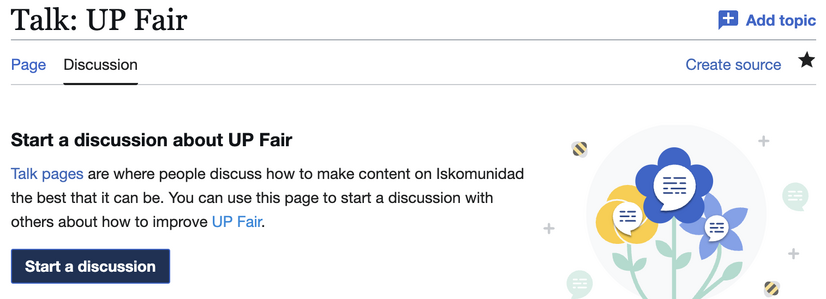
- Enter a clear and descriptive subject for your discussion.
- Write your message, question, or suggestion in the text area provided.
- Click Publish or Post discussion to submit your message.


Participate in a Discussion
- Open an existing discussion to read the messages posted by other contributors.
- Click Reply or edit the discussion to share your response.
- Keep conversations respectful, constructive, and relevant to the page.
- Sign your comments when required using
~~~~in source editing.