
Events and Announcements: Difference between revisions
Updated walkthrough for new announcement and events posting instructions |
m Protected "Events and Announcements" ([Edit=Allow only administrators] (indefinite) [Move=Allow only administrators] (indefinite)) |
||
| (2 intermediate revisions by the same user not shown) | |||
| Line 13: | Line 13: | ||
[[File:Community Announcement output.png|alt=Post-Community Announcement|center|frameless|704x704px]] | [[File:Community Announcement output.png|alt=Post-Community Announcement|center|frameless|704x704px]] | ||
''<big>*Note: The Community Announcement section only displays 5 announcements. Your announcement may not appear if there are multiple announcement posted for that period.</big>'' | ''<big>*Note: The Community Announcement section only displays 5 announcements. Your announcement may not appear if there are multiple announcement posted for that period.</big>'' | ||
[[Category:Tutorials]] | |||
[[Category:How to]] | |||
Latest revision as of 01:11, 4 November 2026
Featured events and announcements can be posted in Iskomunidad.
You can create a community announcement through the Submit a Community Announcement.
Submit a Community Announcement
- The link above will direct you to our announcement form.
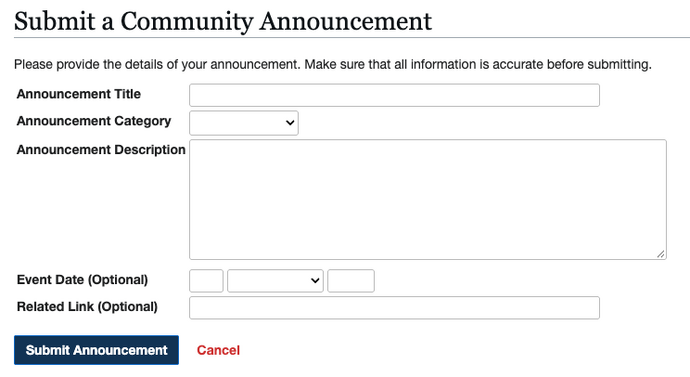
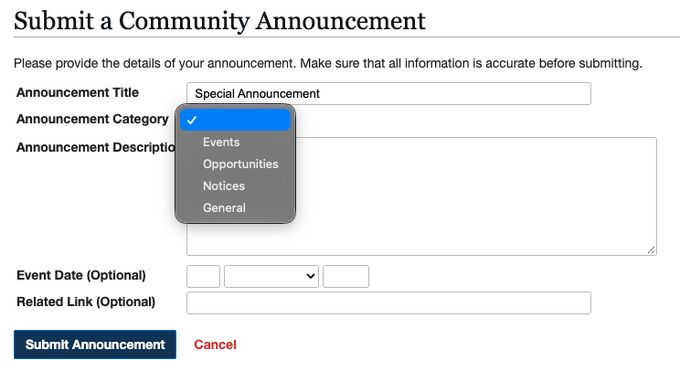
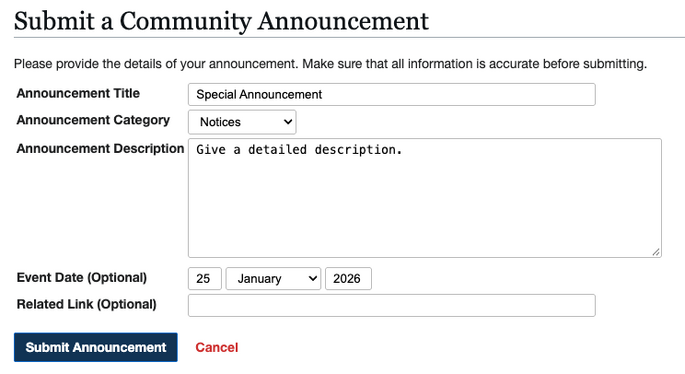
- Make sure to fill-up the necessary fields (Title, Category, Description).
- Click on "Submit Announcement" to finalize your Announcement.
- Once you successfully created your announcement it'll be displayed on the Main Page's Community Announcements section.

- If you need to update your announcement. You can go to your main announcement page and select "Edit" to revise your initial description.


*Note: The Community Announcement section only displays 5 announcements. Your announcement may not appear if there are multiple announcement posted for that period.